
Automated Pool Systems & Mobile Apps for Modern Pool Care
Published on: December 24, 2025 | Last Updated: November 17, 2025
Written By: Rachael Weatherbottom
Automated pool systems and mobile apps pool technology use smart controllers and software to manage pool cleaning, chemical levels, and equipment operation from your smartphone. These systems replace manual adjustments with remote control, letting you schedule tasks, monitor water quality, and operate devices like WiFi pool pumps or robotic cleaners from anywhere. Modern setups work with both new and existing pools, with installation costs ranging from $500 for basic timers to $3,000+ for full automation featuring self-adjusting chemical feeders and energy-efficient filters.
This article explains how automated systems sync with mobile apps to cut weekly maintenance time by up to 80%. We’ll break down core components like chemical sensors that track pH and chlorine levels, variable-speed pumps managed via app schedules, and robotic cleaners with mapping features. Learn how brands like Pentair, Hayward, and Jandy integrate with iOS or Android for wireless pool control.
Compare features across price tiers—from entry-level systems handling basic timers to premium models offering leak detection, freeze protection, and solar heater compatibility. We’ll analyze long-term savings from reduced chemical use and energy-efficient pump controls, plus security tips for protecting WiFi-connected devices. Whether upgrading equipment or starting fresh, discover how smart technology keeps pools cleaner with less effort.
What Are Automated Pool Systems?
Automated pool systems let you run your pool gear with a phone, tablet, or wall unit. These setups link pumps, heaters, lights, and cleaners to one hub. With mobile apps or WiFi, you can tweak settings, track data, and fix issues from anywhere. This tech cuts daily tasks and keeps water safe with less hands-on work.
Crucial Winterizing Products

"The all-in-one solution for a guaranteed clear spring opening."
All-in-One Closing Chemical Kit
Winter demand is high - check stock

"The 'set & forget' option. This is the easiest winterizing I've ever done."
Simple 3-in-1 Winterizing Balls
Winter demand is high - check stock
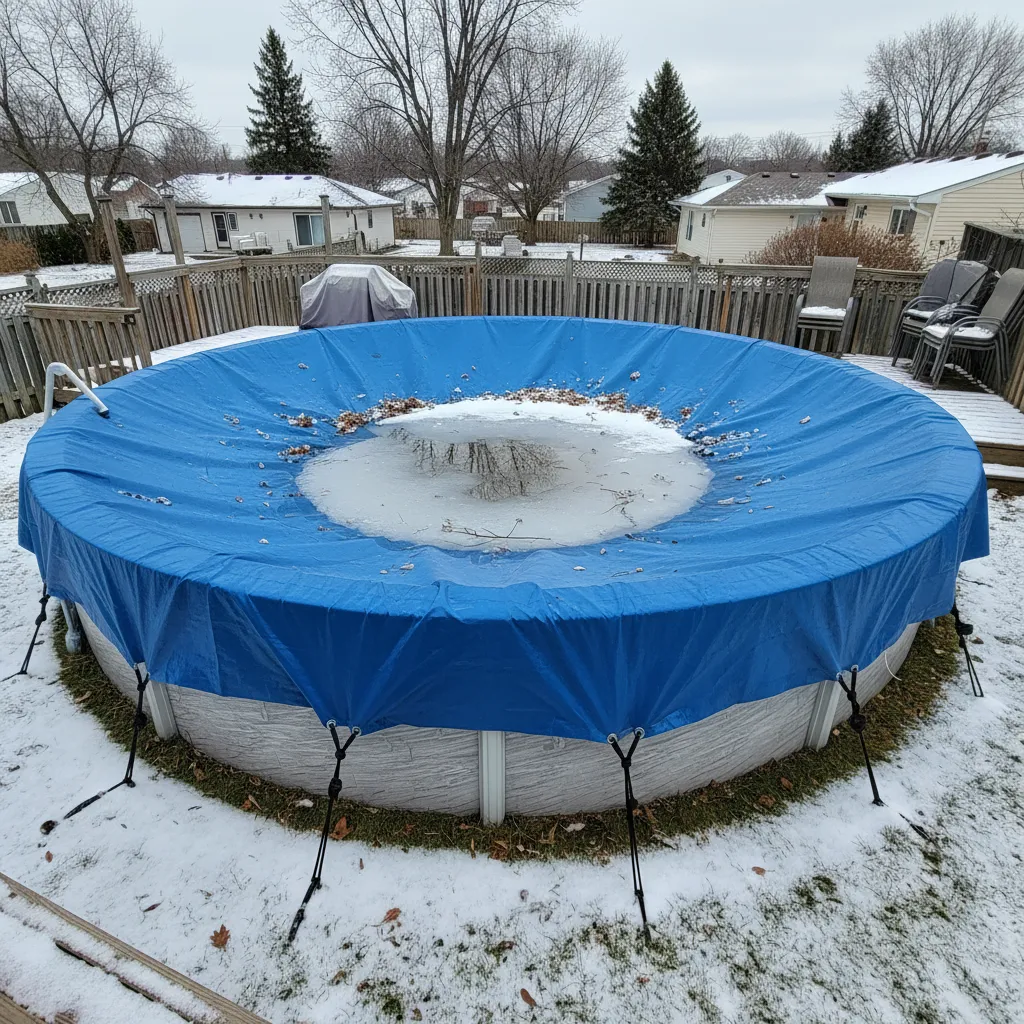
"Invest once to protect your liner and prevent a swamp in the spring."
Heavy-Duty Winter Pool Cover
Winter demand is high - check stock
Core Components Of a Pool Automation System
Every smart pool system needs four main parts:
- Control panel: The brain that talks to all gear and runs preset plans
- Sensors: Track pH (acid level), chlorine, temp, and flow rates in real time
- Relays: Switch devices on/off (like pumps or lights) based on your rules
- Mobile app: Lets you view stats, set timers, or start cleaners from your phone
Top brands like Pentair or Hayward add extras like voice control with Alexa or alerts for leaks.
Types Of Equipment Managed by Automation
Most systems handle six key pool parts:
- Pumps: Set speeds for cleaning vs. filtering (saves up to 80% on power)
- Heaters: Adjust temps by time of day or weather
- Lights: Change colors, dim levels, or sync to music
- Cleaners: Start robotic models via app (like Dolphin E70 or Polaris Quattro)
- Valves: Switch between pool and spa modes in one tap
- Chlorinators: Auto-dose salt or liquid chlorine to keep levels safe
Newer models even link to weather apps to prep for storms or heat waves.
Ready to see how these pieces work with mobile tech? Let’s break down the role of WiFi and apps in daily pool care.
How Automated Pool Systems Work
Modern automated pool systems rely on advanced tech to simplify maintenance. These setups connect physical equipment with digital interfaces, letting owners manage every aspect of pool care through intuitive controls. As pool owners look for ways to enhance their setups, incorporating a pool cover becomes an essential consideration. A good pool cover not only helps maintain water temperature but also reduces debris and cuts down on cleaning time.
Integration With Mobile Apps and Wifi
Pool automation systems with built-in WiFi link directly to apps via home networks. Brands like Pentair IntelliConnect or Hayward OmniLogic use encrypted protocols to sync data between pumps, heaters, and sensors. Once paired, the app-controlled pool system displays real-time stats like water temperature or filter pressure. Users adjust settings through a dashboard that mimics the pool’s physical control panel, eliminating trips to the equipment pad.
Remote Control and Scheduling Capabilities
With wireless pool control, tasks like activating spa jets or setting lighting themes take seconds. Scheduling tools let you program variable-speed pumps to run at 1,200 RPM during off-peak hours, cutting energy use by up to 30%. Alerts notify users if pH drifts beyond 7.2-7.6 or a filter clogs. Some systems even integrate with voice assistants—say “heat the pool to 82°F” while commuting, and it’s ready at arrival.
Essential Features Of Pool Automation Technology
Today’s smart pool systems go beyond basic timers. They combine precision monitoring with proactive maintenance tools, transforming how pools operate.
Smart Chemical Monitoring and Adjustment
Sensors track free chlorine (1-3 ppm), pH (7.4-7.6), and alkalinity (80-120 ppm), sending updates every 15 minutes to the pool maintenance app. Automated dosing systems like the IntelliChem add liquid chlorine or acid as needed, maintaining balance within 0.1 ppm accuracy. This reduces chemical waste by 22% compared to manual testing, per Pool & Spa News data. Keeping the water clean is essential, and that’s where filtration systems come in. A backwash pool cartridge filter helps keep the water clear by removing debris and contaminants efficiently.
App-driven Cleaning and Maintenance
Robotic cleaners like the Dolphin Nautilus CC Plus sync with apps to map pool floors, targeting debris hotspots. Users select brush modes or track progress through the robotic pool cleaner app. Automation also handles backwashing cycles—systems like Jandy VersaFlow calculate filter pressure trends and initiate cleans before flow rates drop below 20 GPM. These advancements make pool maintenance easier than ever. Many automated pool systems even offer mobile apps for remote control and real-time monitoring.
Compatibility With Existing Pool Equipment
Most pool automation systems work with major-brand pumps (Hayward, Pentair), heaters (Rheem, Jandy), and lights (Pentair Globrite). Adapters like the Intermatic PE653RC let older equipment join smart networks. For mixed setups, Z-Wave or Zigbee hubs bridge gaps, letting a single app control 90% of pool functions without costly upgrades.
While these features streamline daily care, evaluating WiFi-enabled systems requires weighing both perks and potential risks—factors we’ll explore next.
Also See: How a Backwash Sand Filter Works for Your Pool
Evaluating Wifi-enabled Pool Control Systems
Modern pool automation systems with built-in WiFi transform how owners interact with their pools. These app-controlled systems eliminate manual adjustments, offering real-time adjustments from any location. Wireless pool control isn’t just convenient—it’s a game-changer for balancing water chemistry, optimizing energy use, and preventing equipment failures. After enjoying a swim, it’s important to consider the health of your hair. Washing your hair after a pool session helps remove chlorine and other chemicals that can cause damage.
Benefits Of Wireless Pool Management
WiFi-enabled systems let users adjust pool temperature, activate robotic cleaners via a pool maintenance app, or monitor chlorine levels through smartphones. Brands like Pentair and Hayward offer integrations with voice assistants (Alexa, Google Home) for hands-free commands. Real-time alerts for pH imbalances or pump malfunctions prevent minor issues from escalating. Systems like Jandy’s iAquaLink even track weather patterns to adjust filtration cycles during storms, reducing energy waste by up to 30%.
Security Considerations for Connected Systems
While WiFi pool pumps and controllers simplify maintenance, they require robust cybersecurity. Look for systems with WPA3 encryption (the latest WiFi security protocol) and mandatory two-factor authentication. Avoid default passwords—hackers often target IoT devices like app-driven smart pool management systems. Regular firmware updates patch vulnerabilities; brands like Hayward OmniPL automatically push updates through their pool control apps.

Cost Analysis Of Automated Pool Systems
Investing in pool automation technology involves upfront costs but delivers measurable savings over time. The price varies based on pool size, equipment compatibility, and desired features like saltwater monitoring or app-driven cleaning schedules. Efficient pool management can also enhance the experience for swimmers. This is especially important in competition pools, where optimal conditions are crucial for performance.
Initial Investment and Installation Expenses
Basic smart pool control panels start at $1,000, while full-scale systems with chemical feeders and WiFi connectivity range from $3,000 to $5,000. Installation adds $500–$2,000, depending on wiring complexity. Retrofitting older pools may require upgrades like variable-speed pumps ($800–$1,500) to maximize automation benefits. Some systems, like Pentair IntelliCenter, offer modular designs—users can add features like spillway controls or lighting later. When considering these upgrades, it’s also important to think about the cost of a pool chiller. A chiller can be a significant investment that impacts overall pool maintenance expenses.
Long-term Savings on Pool Maintenance
Automated pool maintenance reduces chemical waste through precise dosing, cutting annual chemical costs by 20–30%. Energy-efficient pumps linked to smart schedules lower electricity bills—a variable-speed pump paired with automation saves $300+/year. Robotic cleaners with mobile apps (e.g., Dolphin Nautilus CC Plus) reduce professional cleaning fees by 50–70%. Most systems pay for themselves within 3–5 years through reduced labor and resource costs. When managing larger spaces, like a 10,000-gallon pool, these benefits become even more significant. A well-maintained 10,000-gallon pool can enhance your outdoor experience while minimizing upkeep efforts and expenses.
Selecting the Right Pool Automation System
Choosing between brands like Hayward, Pentair, or Jandy requires evaluating performance metrics, user feedback, and integration capabilities. Prioritize systems that align with your pool’s unique needs—saltwater compatibility, solar heating support, or multi-zone lighting control. Additionally, it’s important to consider how these systems affect water chemistry. The calcium saturation index plays a key role in maintaining balanced water conditions, ensuring the longevity of your pool equipment.
Comparing Key Functionalities and Performance
Top-tier systems offer granular control: scheduling filter cycles in 15-minute increments or adjusting chlorine output by 0.1 ppm increments. Check response times—delays over 2 seconds in app-controlled pool systems signal weak processors. For saltwater pools, ensure the automation includes corrosion-resistant sensors. Compatibility matters; some systems only integrate with proprietary robotic cleaners or require third-party hubs for Alexa/Google Home. Proper automation enhances the overall efficiency of swimming pools. This ensures cleaner water and reduces maintenance efforts for pool owners.
User Reviews and Reliability Factors
Browse verified buyer reviews on platforms like Amazon or specialty retailers. Look for mentions of app stability—frequent crashes in pool control apps indicate poor software development. Brands with 4+ star ratings across 1,000+ reviews (e.g., Pentair IntelliTouch) typically offer reliable performance. Check warranty terms; 3–5 years is standard for premium systems. Avoid models with proprietary parts that inflate repair costs.
Even the most advanced systems can face occasional hiccups—connectivity glitches or sensor calibration errors often stem from simple fixes.

Troubleshooting Common Automation Issues
Even top-tier smart pool systems face hiccups. Spotting and fixing these fast keeps your pool in top shape with less downtime.
Connectivity Problems With Mobile Apps
Dropouts between your phone and pool gear often stem from weak WiFi. Check if your router covers the pool area—most need a strong signal within 100 feet. Swap to a 2.4 GHz band if gear won’t link; some systems can’t use 5 GHz. For app glitches, force-close the pool control app and reboot your phone. Still stuck? Delete and reinstall the app to clear cached bugs. When using any smart pool equipment, having reliable network connections is essential. Pool valves play a key role in managing water flow, making their proper functioning important for maintaining your pool.
If the app shows “offline,” power-cycle your pool’s control panel. Unplug for 30 seconds, then restart. For systems with built-in WiFi, verify the IP address hasn’t changed. Use your router’s admin page to assign a static IP if needed. Mesh networks like Google Nest can boost range for pools far from the house.
Resolving Sensor and Equipment Errors
Faulty pH or chlorine readings? Clean sensors monthly with a soft brush and rinse. Build-up from calcium or dirt skews data. If your smart pool control alerts “Low Flow,” check pump baskets for clogs and valves for proper open/close settings. Reset the system via the app to clear false flags. Keeping your pool properly balanced is important for safe swimming. A swim shocked pool ensures clear water and kills harmful bacteria.
For pumps or heaters that won’t start, confirm breakers are on and voltage matches specs (120V or 240V). Test outlets with a lamp to rule out dead circuits. If a robotic pool cleaner app reports errors, inspect the bot for tangled debris or worn parts like belts. Most models need new drive belts every 2-3 seasons.
Automated pool systems with ORP (oxidation-reduction potential) sensors may need recalibration. Use test strips to cross-check water stats. If numbers don’t align, recalibrate sensors via the app’s settings menu—this takes under 10 minutes.
Got these fixes down? You’re set to handle most tech snags. Next up: answers to the top questions pool owners ask about smart systems.
FAQs on Automated Pool Systems and Mobile Apps
Can I Control Multiple Pool Devices Through a Single Mobile App?
Yes, most modern systems like Pentair IntelliCenter or Hayward OmniPL consolidate control into one pool maintenance app. These platforms support cross-brand integrations via Z-Wave or Zigbee hubs, letting you manage pumps, lights, cleaners, and heaters without switching between apps. Advanced systems even prioritize tasks—like pausing cleaning during heating cycles—to avoid conflicts.
Do Automated Pool Systems Require Internet Access to Function?
No, core functions like scheduled filtering, chemical dosing, or temperature control operate offline using pre-programmed settings. Internet access is only required for remote adjustments, real-time alerts, or accessing historical data through the pool control app. Local WiFi ensures commands execute within 1-2 seconds, even without cloud connectivity.
How Do Automation Systems Handle Software Updates?
Updates are pushed automatically over WiFi to maintain security and add features. Brands like Jandy Aqualink schedule updates during off-peak hours to avoid disrupting pool operations. Users receive notifications and can delay installations for up to 30 days, but critical patches (e.g., security fixes) install immediately during system idle times.
Can I Integrate Pool Automation With Smart Home Systems Like Google Home?
Yes, leading systems support Alexa, Google Assistant, and Apple HomeKit. Voice commands adjust pool temperature, activate lighting themes, or start robotic cleaners. For example, saying “Hey Google, set spa mode to 102°F” triggers valves, heaters, and pumps via compatible hubs like Hubitat or SmartThings.
What Backup Options Exist if the Mobile App Fails?
All automated pool systems include physical control panels with touchscreen or button interfaces. Web-based dashboards accessible via browser serve as a secondary option. Some models, like Hayward OmniLogic, offer SMS-based commands for basic functions—text “POOL HEAT ON” to activate heaters if the app crashes. Keeping your pool safe is just as important as controlling its features. A pool alarm can alert you to unwanted access, giving you peace of mind while enjoying your automated pool.
Closing Thoughts
Automated pool systems and mobile apps transform pool care from a chore into a seamless experience. With smart chemical monitoring, remote scheduling, and app-driven cleaning, these technologies save time and reduce maintenance hassles. Wireless control lets you manage pumps, heaters, and cleaners from anywhere—no more manual adjustments.
While the initial investment ranges from $500 to $5,000, long-term savings on energy and chemicals justify the cost. Prioritize compatibility with existing equipment and reliable app performance when choosing a system. For connectivity issues, ensure strong WiFi signals and update firmware regularly.
Ready to optimize your pool care? Explore more guides and tools at My Pool Calculator to find the right automation setup for your needs. Smart technology makes maintaining a pristine pool easier than ever.
Additional Resources for You:
- Grimes, R. J. (2015). Troubleshooting and Repairing Pool Plastics, PVC, and Vinyl Liners. Chicago, IL: CreateSpace Independent Publishing.
- Control Your Pool with Automation
- Pool Automation: Smart Pool Controls for Mobile Devices – Barrier Reef Fiberglass Pools, LLC.
- Automated Pool Systems and Mobile Apps – Pool Technology – Pool Calculator
- Poolside Tech
A pool care geek who’s been testing water chemistry since she was tall enough to reach the skimmer.
Pool Equipment Repair, Pumps & Motors